MOBILE APPS · CULLBOX
Cullbox: culling 3,000 photos on a phone, without the wait
A wedding photographer comes home with 3,000 frames and the client sees 300. In between sits the most tedious job in the profession — Cullbox moves it onto the phone and tablet.
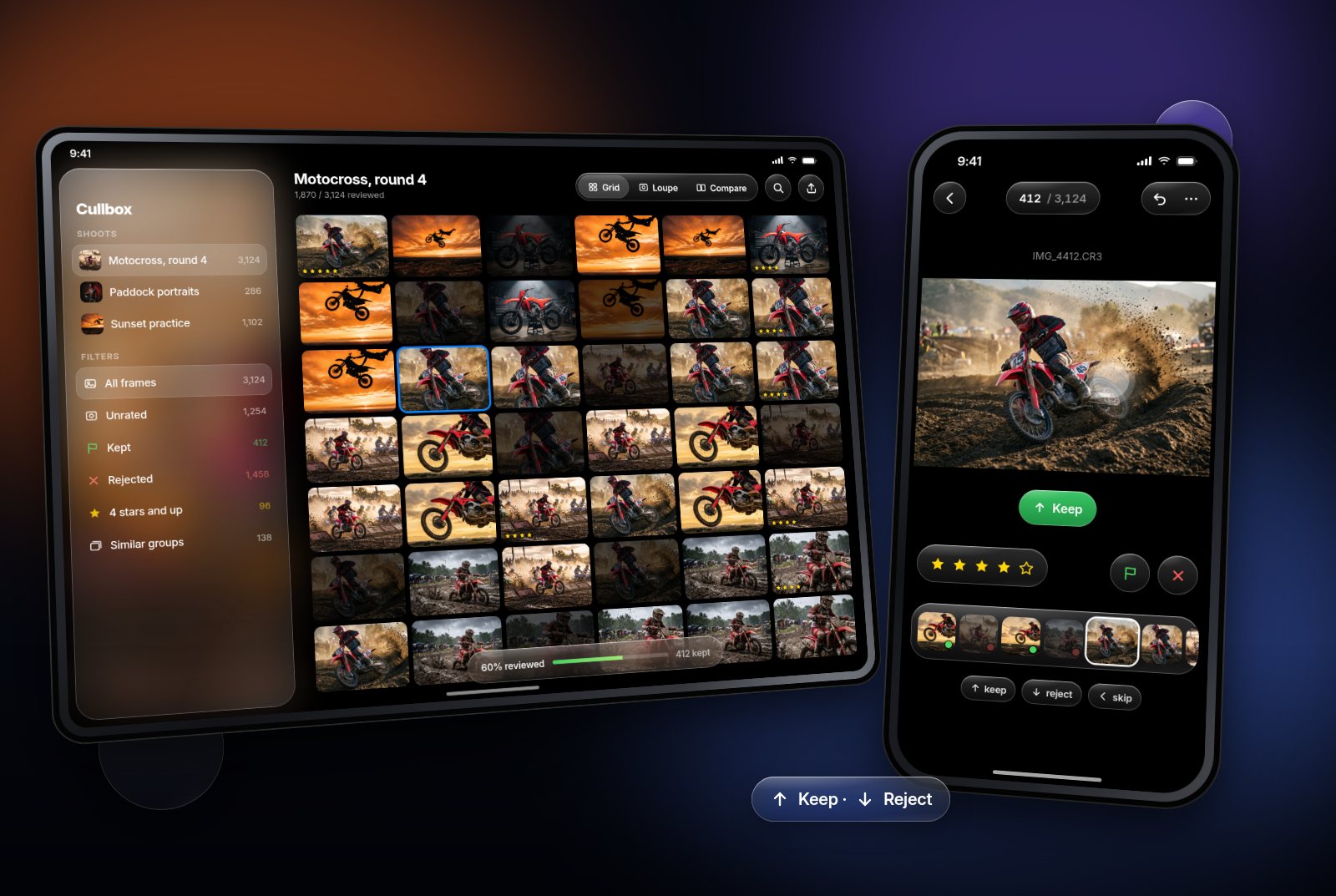
A wedding photographer comes home with somewhere between 2,000 and 4,000 frames. The client will see 300. Everything in between is the job photographers call culling — the selection. And that selection is the most time-consuming, least creative and worst supported part of the profession.
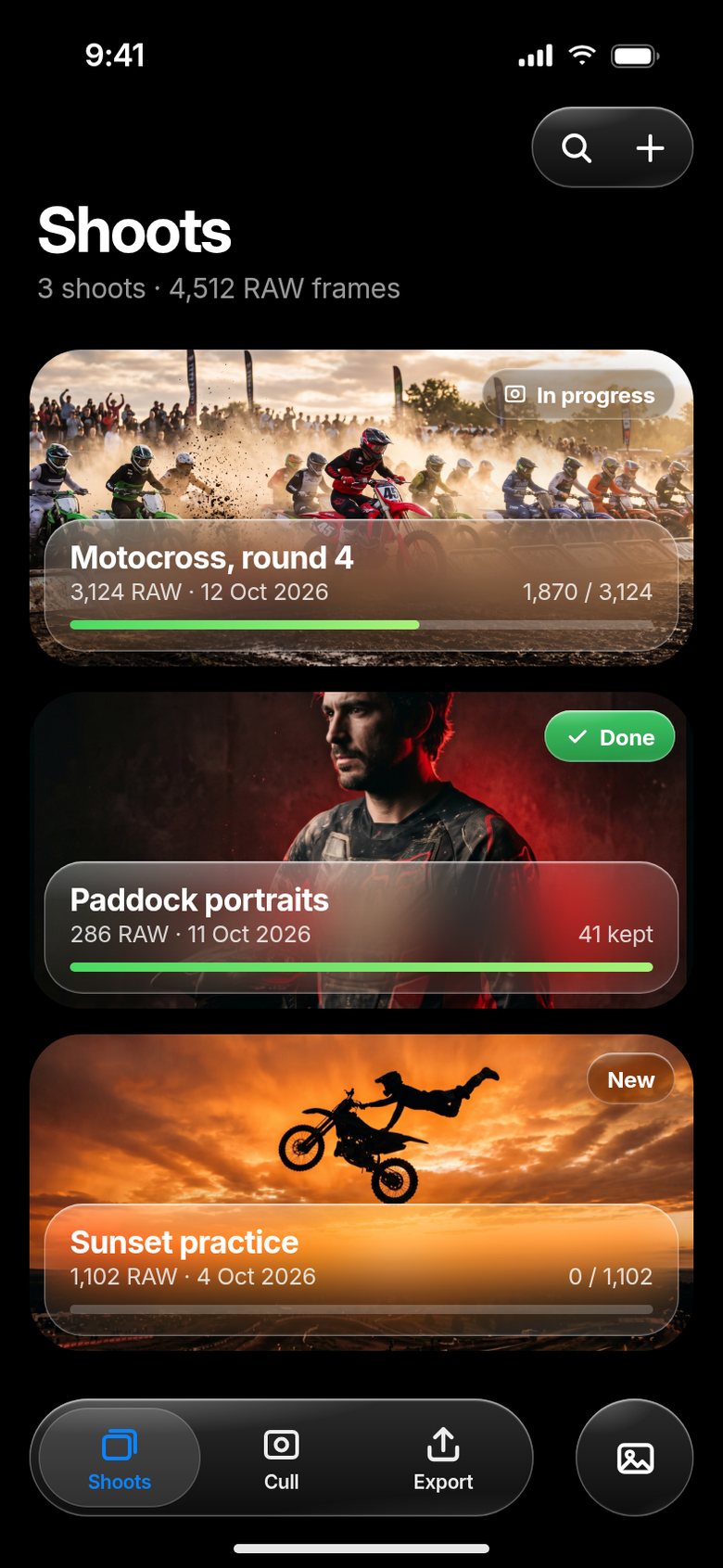
Cullbox is our app for iPhone and iPad that moves this step off the desk and onto the phone and tablet. It opens frames instantly, the photographer rates them with a swipe, near-identical shots are stacked into groups, and the selection goes straight on to Lightroom or Capture One. All of it on the device, with nothing uploaded anywhere.
The starting point: why culling is a hard problem
At first glance it is just looking at pictures. In reality it is three problems at once:
- Volume. 3,000 RAW files come to 90 GB. You cannot simply load and display that.
- Speed. With half a second of lag between frames, culling 3,000 of them means 25 minutes of pure waiting. The transition has to be instant.
- Precision. Deciding whether the eyes are sharp takes a look at 100% zoom. A low-resolution preview does not show it.
That is why most culling tools are desktop software: a computer has memory and processing power a phone does not. Cullbox is built around the question of how to do the same job on the device the photographer already carries — on the way back from a shoot, on a train, in a hotel room.
Part 1: Speed — a frame is never opened the moment you look at it
The key is that a frame is never opened at the moment the photographer looks at it. The app works in three layers:
- The preview embedded in the RAW file. Every camera writes a JPEG preview into the file — it reads in milliseconds and is used for browsing and the grid.
- Caching ahead and behind. While you look at frame 40, frames 41 and 42 are already prepared and 39 and 38 are still in memory. Browsing is lag-free in both directions.
- Full decoding on demand. Only when you zoom in is the file decoded at full resolution — and only the part of the image you are looking at.
All of this runs on separate threads so the interface never stutters. Stutter while browsing is the one fault a photographer will not forgive. Close the app mid-cull and the session resumes on the same frame next time.
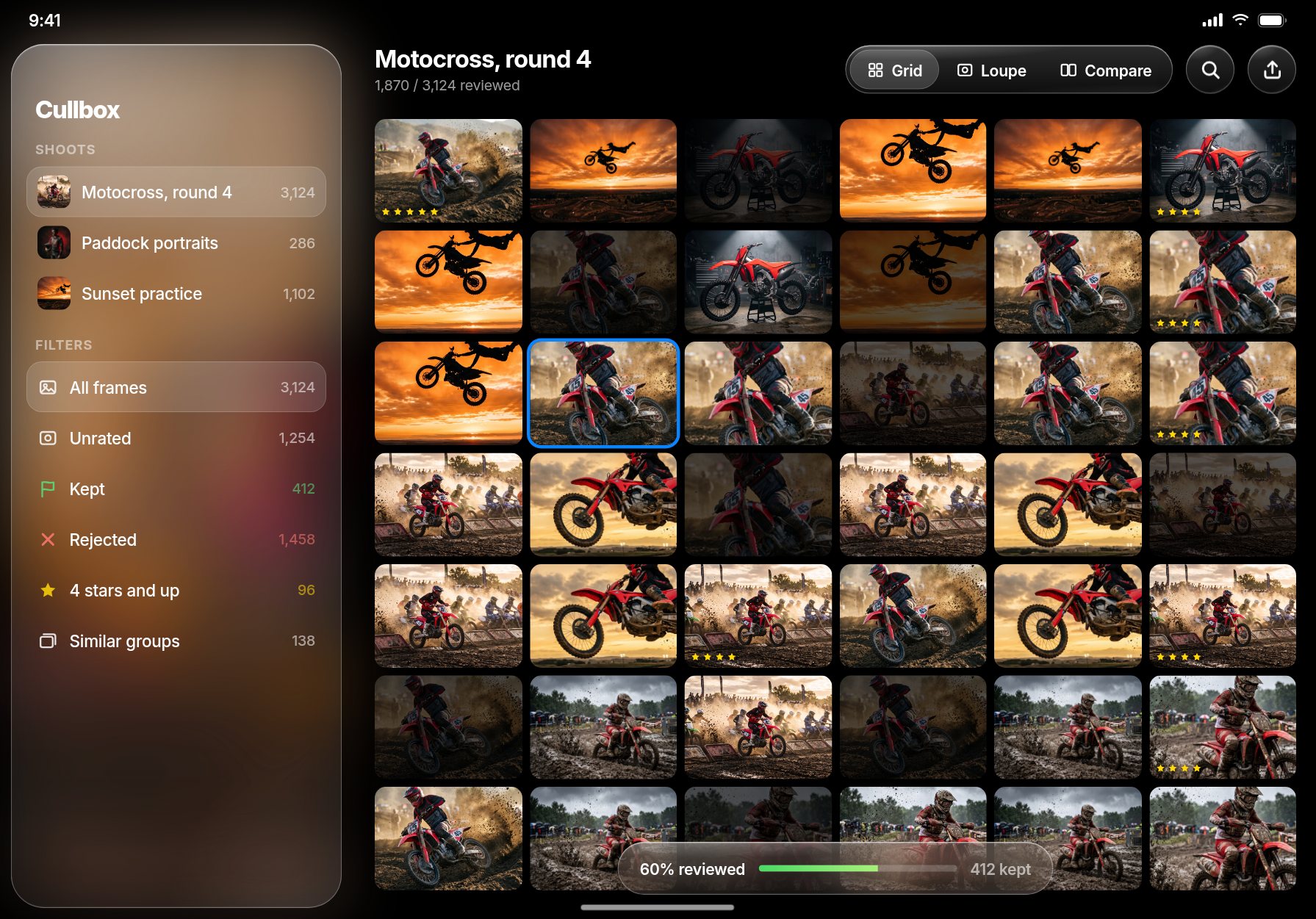
On iPad the shoot is laid out as a grid: shoots and filters on the side — unrated, kept, rejected, four stars and up, similar groups — and a switch between grid, loupe and compare at the top. Rejected frames stay in the grid, dimmed, so the photographer always sees how much of the shoot is already behind them.
Part 2: Rating that does not break the rhythm
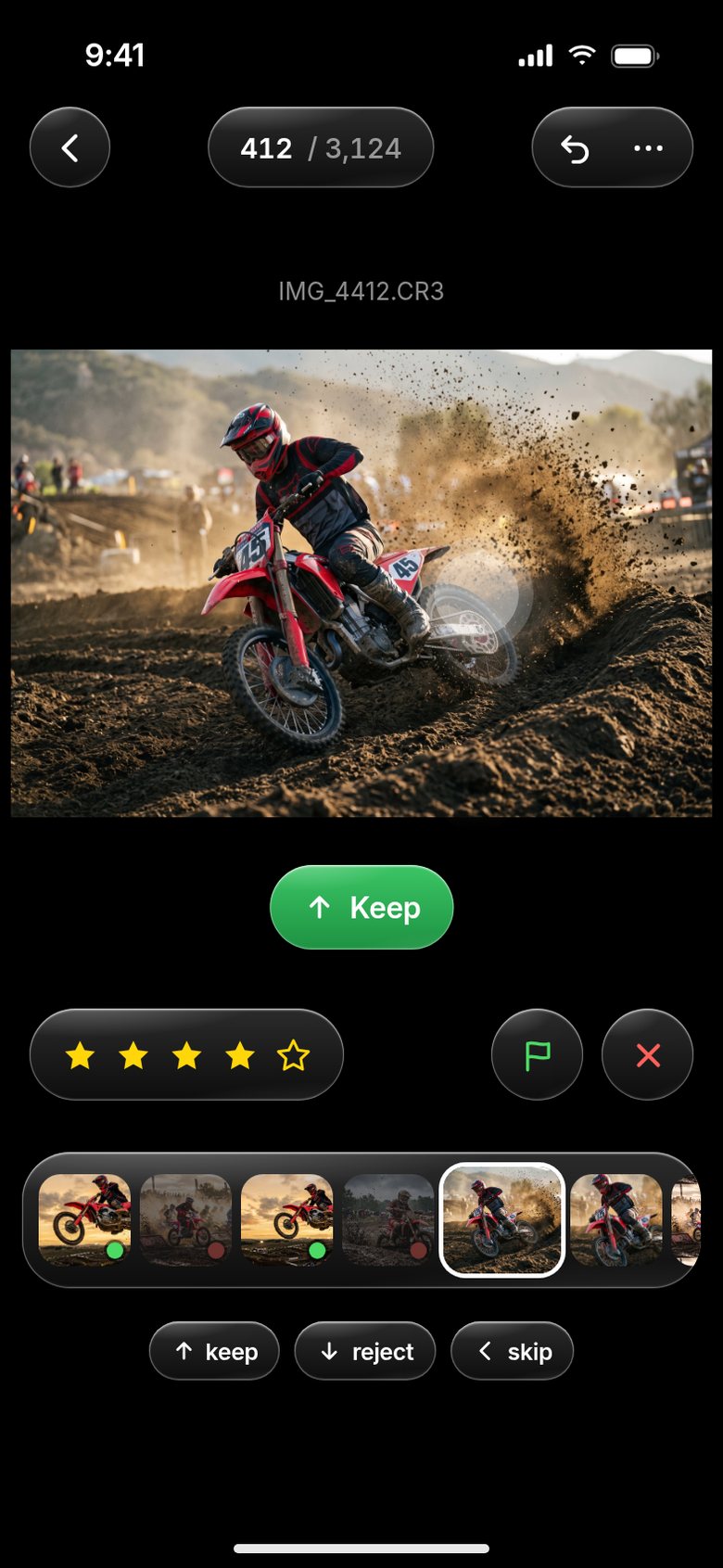
Photographers rate in two ways: with flags (keep / reject) or with stars (1–5). Cullbox supports both, with one difference — a rating is given with a swipe, not by tapping a small button.
Swipe up to keep, down to reject, sideways to skip. The hand stays in one place, the eyes on the picture. Across 3,000 frames that difference saves more than half an hour. Below the image runs a strip of neighbouring frames with green and red dots, so earlier decisions stay visible without going back.
Every action can be undone, even a hundred steps back. At this pace a wrong swipe is inevitable; the danger is not a mistake but an irreversible one.
Part 3: Groups of similar frames
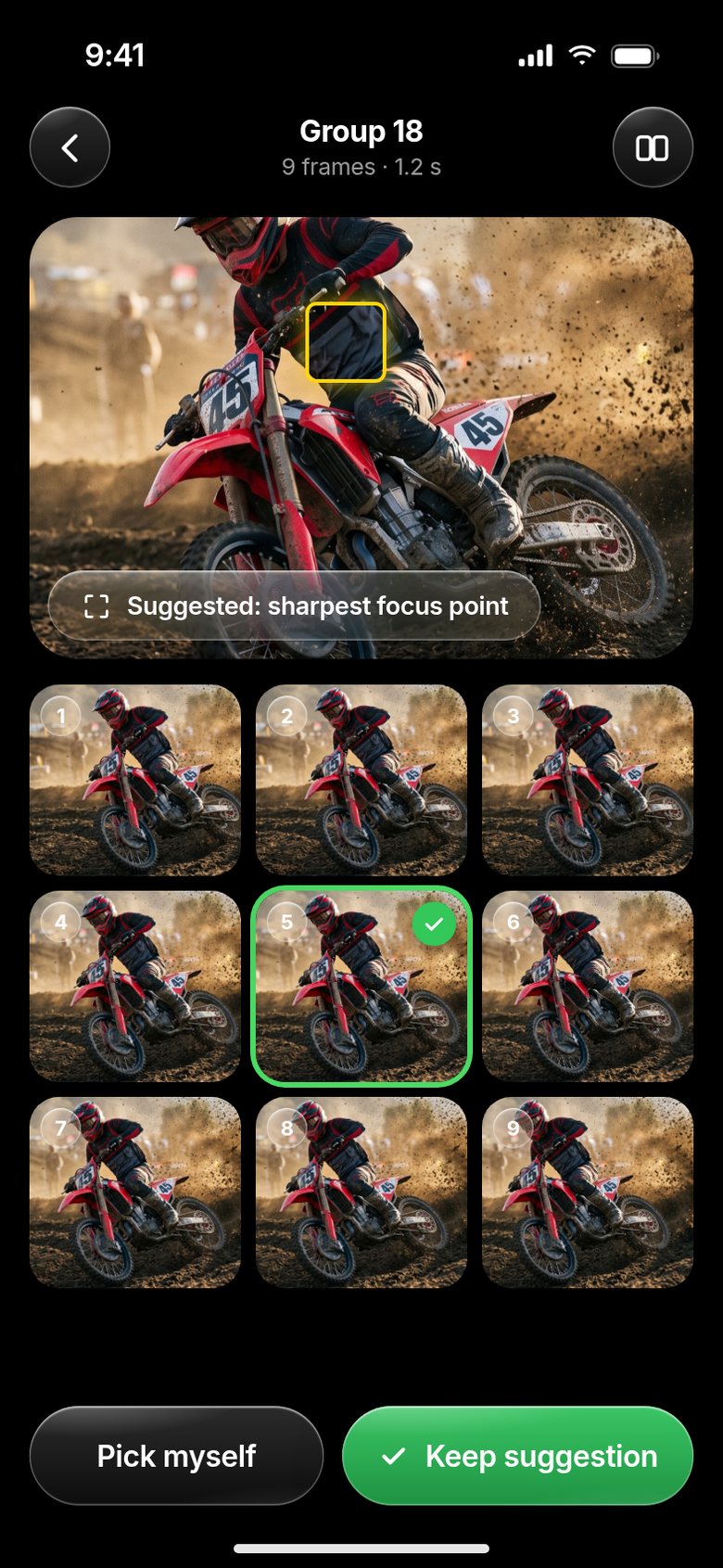
A fast burst produces ten nearly identical frames. The photographer wants the best of them, not each one separately.
Cullbox groups frames by two criteria: capture time (frames within the same second or two) and visual similarity — computed from a downscaled version of the image, without sending anything to a server. Within a group the app suggests the frame with the sharpest selected focus point, and the decision stays with the photographer: keep the suggestion with one tap or pick another.
Software should not make the call in a cull. It should only make sure the photographer does not make the same call ten times.
Cullbox — photo culling for photographers
Thousands of frames reviewed in minutes: instant previews, rating with a swipe, groups of similar shots and export of the selection straight into editing.
How we build mobile apps →Part 4: The selection moves on to editing
A selection is only useful if it reaches editing. So Cullbox exports in three ways:
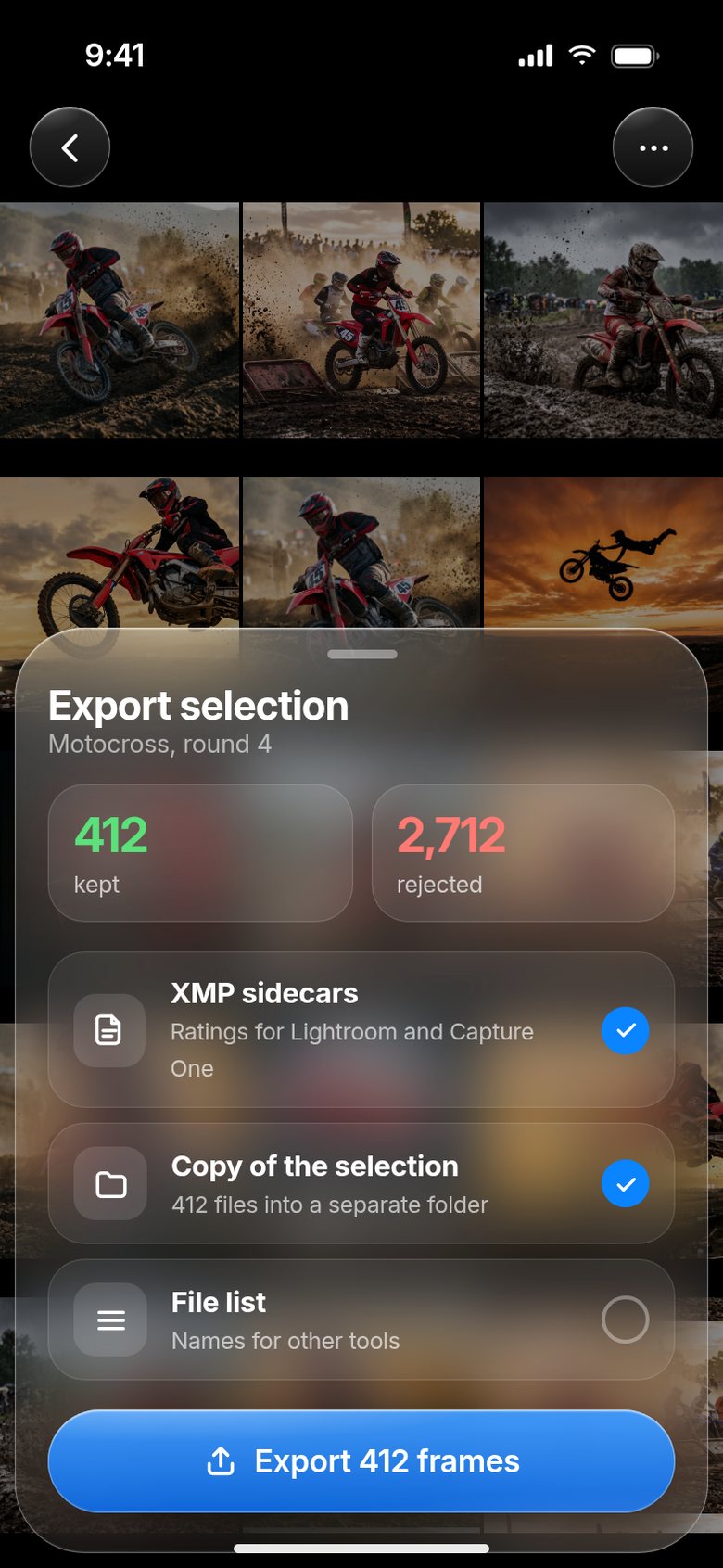
- XMP sidecar files — the standard rating format read by Lightroom and Capture One. The photographer opens the folder on the computer and the ratings are already there.
- A copy of the selection into a separate folder, without the rejects.
- A list of file names for processing in other tools.
Before exporting, the app shows how many frames were kept and how many rejected. The original RAW files stay untouched — Cullbox writes its decisions next to them, not into them.
Part 5: Privacy by design, not by promise
Wedding and family photos are among the most sensitive material anyone keeps. That is why Cullbox uploads frames nowhere. All processing — previews, similarity, rating — happens on the device. The app does not even need an internet connection for its core work.
It is also the harder technical path: without a server everything has to run fast enough on a device with limited memory and battery. That is exactly why most tools in this space are desktop software.
What this means if you are planning an app of your own
Cullbox is a good example of a project where 90 percent of the work is invisible: memory management, caching, threading, restoring a session after an interruption. The visible part — a screen with a picture and a swipe — is a few days of work.
If you are comparing quotes for a mobile app, this is the best question you can ask: what happens when there is ten times more data than we planned for? The answer tells you more than the whole pitch.
How an app gets from idea to release is described in the VoiceInbox story: how an app gets into the App Store.